HDU-OS-2 Linux内核模块编程

Linux 提供的模块机制能动态扩充 linux 功能而无需重新编译内核,已经广泛应用在 linux 内核的许多功能的实现中。

不知你看到这段话时是否和我一样脱口而出 MD! ZZ! ,毕竟上一个通过重新编译内核扩充 Linux 功能的实验耗时之久令人印象深刻。哪成想今天区区几分钟就和曾经编译几小时达到一样的效果。不禁感先人之伟大,觉自己之智障。废话少说,我们直奔主题!

实验要求

(1) 设计一个模块,要求列出系统中所有内核线程的程序名、PID、进程状态、进程优先级及父进程PID。
(2) 设计一个带参数的模块,其参数为某个进程的 PID 号,该模块的功能是列出该进程的家族信息,包括父进程、兄弟进程和子进程的程序名、PID 号、进程状态。
(3) 请根据自身情况,进一步阅读分析程序中用到的相关内核函数的源码实现。

准备

1
2
3
$ mkdir os_2 # 新建文件夹 
$ cd os_2
$ mkdir all_task family_task # 分别存放模块1,模块2的所有资源

模块一(无参)

编辑模块

1
2
$ cd all_task 
$ vim all_task.c
1
2
3
4
5
6
7
8
9
10
11
12
13
14
15
16
17
18
19
20
21
22
23
24
25
// /home/user/os_2/all_task/all_task.c
#include <linux/init.h> // 包含 模块初始化和清理函数的定义
#include <linux/module.h> // 包含 加载模块所需要的函数和符号的定义
#include <linux/kernel.h>
#include <linux/sched.h>
#include <linux/init_task.h>
static int all_task_init(void)
{
struct task_struct *p;
for_each_process(p) { // 依次访问链表的每个进程

if(p->mm==NULL) // 对于内核线程,p->mm 等于 NULL
printk(KERN_ALERT"%s\t%d\t%ld\t%d\t%d\n", p->comm, p->pid, p->state, p->prio,p->parent->pid);

}
return 0;
}
static void all_task_exit(void)
{
printk(KERN_ALERT"all_task module exit\n");
}

module_init(all_task_init);
module_exit(all_task_exit);
MODULE_LICENSE("GPL");

编辑 Makefile

1
$ vim Makefile
1
2
3
4
5
6
7
obj-m := all_task.o
KDIR := /lib/modules/$(shell uname -r)/build
PWD := $(shell pwd)
default:
make -C $(KDIR) M=$(PWD) modules
clean:
make -C $(KDIR) M=$(PWD) clean

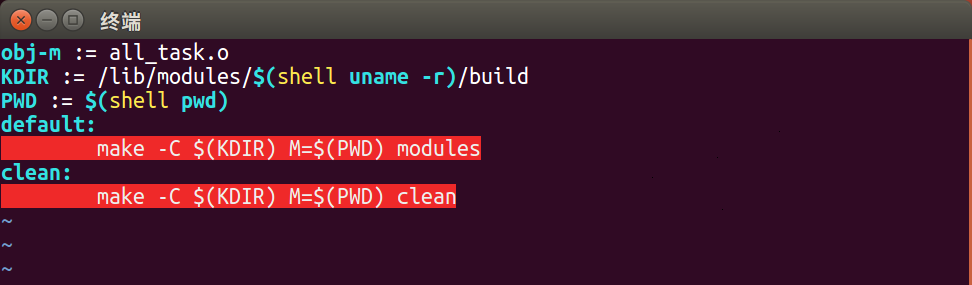
[*] Caution! make 前是 TAB 而非多个 ,错误缩进会高亮报错且导致编译错误,比如像下面这样
编译模块

1
2
3
4
5
6
7
8
9
$ make # 编译模块
make -C /lib/modules/4.15.0-36-generic/build M=/home/dry/os_2/all_task modules
make[1]: Entering directory '/usr/src/linux-headers-4.15.0-36-generic'
CC [M] /home/dry/os_2/all_task/all_task.o
Building modules, stage 2.
MODPOST 1 modules
CC /home/dry/os_2/all_task/all_task.mod.o
LD [M] /home/dry/os_2/all_task/all_task.ko
make[1]: Leaving directory '/usr/src/linux-headers-4.15.0-36-generic'

加载模块

1
2
3
4
5
6
7
8
9
10
11
12
$ insmod all_task.ko # 尝试加载模块,发现权限不够
insmod: ERROR: could not insert module all_task.ko: Operation not permitted
$ su root # 开启 root 权限
# insmod all_task.ko # 再次加载模块,若出现 File exists 字样,说明内核存在同名模块,应先卸载 rmmod all_task.ko
# modinfo all_task.ko # 查看模块详细信息
filename: /home/dry/os_2/all_task/all_task.ko
license: GPL
srcversion: C497B5445403A79FBDD4B93
depends:
retpoline: Y
name: all_task
vermagic: 4.15.0-36-generic SMP mod_unload

查看结果

1
2
3
4
5
6
7
8
9
$ dmesg # 在日志文件中查看结果
[47637.989469] all_task module exit
[47642.038814] kthreadd 2 1 120 0
[47642.038818] kworker/0:0H 4 1026 100 2
[47642.038820] mm_percpu_wq 6 1026 100 2
[47642.038821] ksoftirqd/0 7 1 120 2
[47642.038823] rcu_sched 8 1026 120 2
... ...
$ ^C # CTRL+C 退出

检验结果

1
2
3
4
5
6
7
8
9
10
$ ps aux # ps aux 列出所有进程/线程,COMMAND 带有 [ ] 的为内核线程
USER PID %CPU %MEM VSZ RSS TTY STAT START TIME COMMAND
root 1 0.0 0.2 185444 4524 ? Ss 11月05 0:07 /sbin/init spla
root 2 0.0 0.0 0 0 ? S 11月05 0:00 [kthreadd]
root 4 0.0 0.0 0 0 ? S< 11月05 0:00 [kworker/0:0H]
root 6 0.0 0.0 0 0 ? S< 11月05 0:00 [mm_percpu_wq]
root 7 0.0 0.0 0 0 ? S 11月05 0:00 [ksoftirqd/0]
root 8 0.0 0.0 0 0 ? S 11月05 0:55 [rcu_sched]
... ...
$ ^C # CTRL+C 退出
1
2
3
4
5
6
7
8
9
10
11
12
13
14
15
16
17
18
19
20
21
22
23
24
25
26
27
28
# 表头具体含义
USER 进程的属主
PID 进程的ID
PPID 父进程ID
%CPU 占用的CPU百分比
%MEM 占用内存的百分比
NI 进程的NICE值
VSZ 进程使用的虚拟內存量(KB)
RSS 进程占用的固定內存量(KB)
TTY 进程运作的终端;
START 进程被触发启动的时间
TIME 该进程实际使用CPU的时间
COMMAND 命令的名称和参数

# START 常规状态
D 无法中断的休眠状态
R 正在运行的
S 处于休眠状态
T 停止或被追踪
W 进入内存交换的
X 死掉的进程
Z 僵尸进程
< 优先级高的进程
N 优先级较低的进程
L 有些页被锁进内存
s 进程的领导者
l 多进程的
+ 位于后台的进程组

卸载模块

1
# rmmod all_task.ko # 卸载模块

实验详解

[*] Caution! 下面所有源码的引用均以 v4.18.12 为例,均以 linux 内核所在的目录为根目录

Process & Thread

进程(英语:process),是计算机中已运行程序的实体。进程为曾经是分时系统的基本运作单位。
是具有一定独立功能的程序关于某个数据集合的一次运算过程,是系统进行资源分配和调度的独立单位。
进程的两个基本元素:一个或一组可执行的程序、与程序有关的数据集。
线程(英语:thread)是操作系统能够进行运算调度的最小单位。它被包含在进程之中,是进程中的实际运作单位。一条线程指的是进程中一个单一顺序的控制流,一个进程中可以并发多个线程,每条线程并行执行不同的任务。
在Unix System V及SunOS中也被称为轻量进程(lightweight processes),但轻量进程更多指内核线程(kernel thread),而把用户线程(user thread)称为线程。

task_struct

task_struct被称为进程描述符(process descriptor),是Linux内核的一种数据结构。它会被装载到RAM中并且包含着进程的信息。每个进程都把它的信息放在 task_struct 这个数据结构体。

1
2
3
4
5
6
7
8
9
10
11
12
13
14
15
16
17
18
19
20
21
22
23
24
// ./include/linux/sched.h
struct task_struct {

......
volatile long state; // 602 lines
......
int prio; // 639 lines
int static_prio;
int normal_prio;
unsigned int rt_priority;
......
struct mm_struct *mm; // 688 lines
struct mm_struct *active_mm;
......
pid_t pid; // 742 lines
......
struct sched_entity *parent; // 759 lines
......
struct list_head children; // 764 lines
struct list_head sibling;
......
char comm[TASK_COMM_LEN]; // 842 lines
......
}

mm_struct

咳咳!敲黑板!

task_struct 被称为'进程描述符'(process descriptor),因为它记录了这个进程所有的context。其中有一个数据结构 mm_struct,被称为'内存描述符'(memory descriptor),抽象地描述了Linux视角下管理进程地址空间的所有信息。
每个进程都有自己独立的 mm_struct ,使得每个进程都有一个抽象的平坦的独立的地址空间,各个进程都在各自的地址空间中相同的地址内存存放不同的数据而且互不干扰。如果进程之间共享相同的地址空间,则被称为线程。

1
2
3
4
5
6
7
8
9
10
11
12
13
14
15
16
17
18
19
20
21
22
23
// ./include/linux/mm_types.h
struct mm_struct {
struct vm_area_struct *mmap; /* list of VMAs */
struct rb_root mm_rb;
u64 vmacache_seqnum; /* per-thread vmacache */
#ifdef CONFIG_MMU
unsigned long (*get_unmapped_area) (struct file *filp,
unsigned long addr, unsigned long len,
unsigned long pgoff, unsigned long flags);
#endif
unsigned long mmap_base; /* base of mmap area */
unsigned long mmap_legacy_base; /* base of mmap area in bottom-up allocations */
#ifdef CONFIG_HAVE_ARCH_COMPAT_MMAP_BASES
/* Base adresses for compatible mmap() */
unsigned long mmap_compat_base;
unsigned long mmap_compat_legacy_base;
#endif
unsigned long task_size; /* size of task vm space */
unsigned long highest_vm_end; /* highest vma end address */
pgd_t * pgd;
...太多暂且不放了...
...请自行查阅源码...
}

Process & Kernel Thread

每个进程描述符都包含: mmactive__mm ,其中 mm 成员指向进程拥有的内存描述符,而 active_mm 则指向当前正在执行的内存描述符。
对于普通进程来说,二者是一样的;但是对于 kernel 线程没有内存描述符,mm 为空,active_mm 指向前一个执行进程的 mm

list_head

1
2
3
4
// ./drivers/gpu/drm/nouveau/include/nvif/list.h
struct list_head {
struct list_head *next, *prev;
};

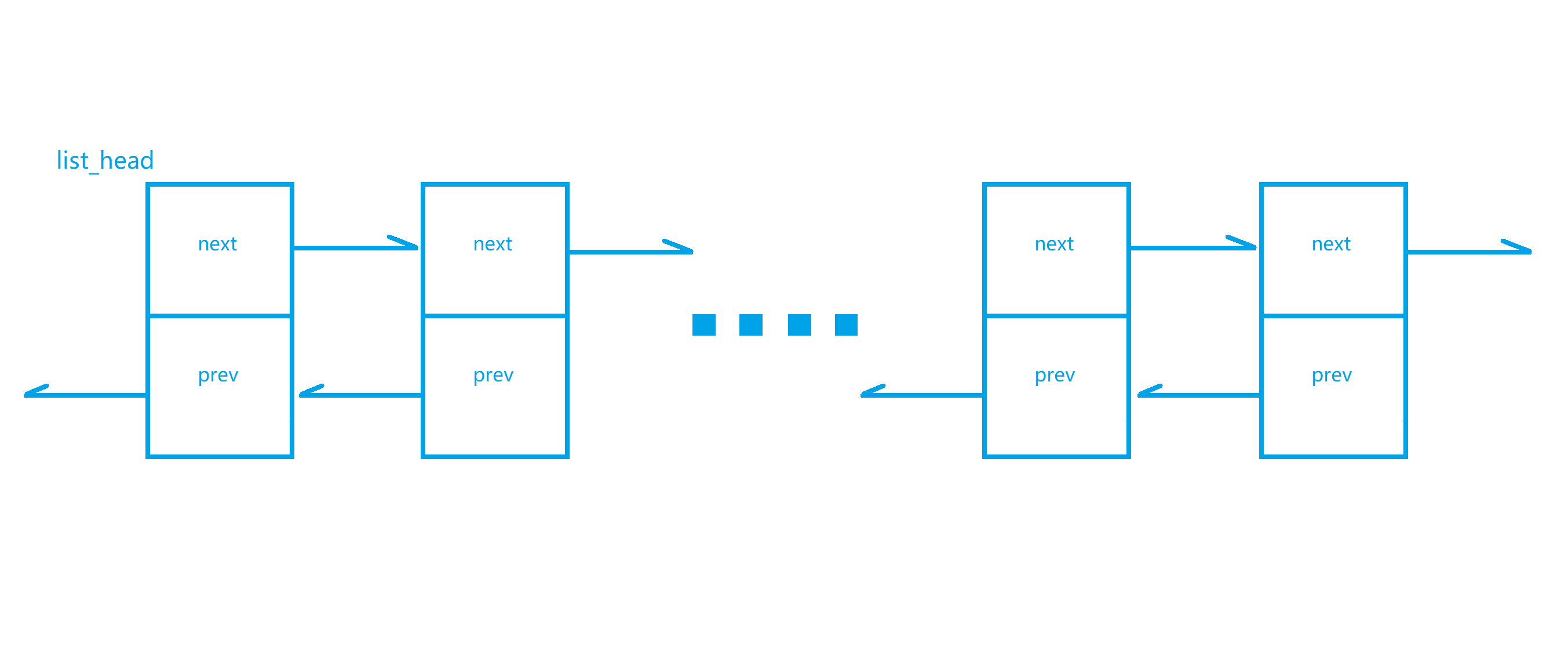
如图所示(随手画的,请别挑剔),结构体 list_head 包含两个指针成员:next , prev 。这两个指针成员都是 list_head 类型,以此构成链表。实际应用中,list_head 结构体往往实例化为其他结构体的成员,可以参考 task_struct 中的 children,sibling

for_each_process()

此宏的功能是依次访问链表的每个进程

1
2
3
// /include/linux/sched/signal.h
#define for_each_process(p) \
for (p = &init_task ; (p = next_task(p)) != &init_task ; )

模块二(含参)

编辑模块

1
2
3
$ cd .. # 返回上一级目录,即 os_2 根目录
$ cd family_task
$ vim family_task.c
1
2
3
4
5
6
7
8
9
10
11
12
13
14
15
16
17
18
19
20
21
22
23
24
25
26
27
28
29
30
31
32
33
34
35
36
37
38
39
40
41
42
43
44
45
46
47
48
49
50
51
52
53
54
55
56
57
// /home/user/os_2/family_task/family_task.c
#include <linux/init.h>
#include <linux/module.h>
#include <linux/kernel.h>
#include <linux/sched.h> //task_struct
#include <linux/init_task.h>
#include <linux/moduleparam.h> //含参模块
MODULE_LICENSE("GPL");

static int pid;
module_param(pid, int, 0644); //加载模块时传递参数

static int family_task_init(void)
{
struct task_struct *own, *parent, *ptr = NULL;
struct list_head *head, *list_ptr = NULL;
// 获得 sibling 在 task_struct 中的相对偏移量
unsigned long sibling_offset = (unsigned long)&((struct task_struct *)0)->sibling;

for_each_process(own) { //依次访问链表的每个进程
if(own->pid == pid) {
printk("This process: comm=%s\t pid=%d\t state=%ld\n", own->comm, pid,own->state);
// his parent
parent = own->parent;
printk("his parent: comm=%s\t pid=%d\t state=%ld\n", parent->comm, parent->pid,parent->state);
// his children
head = &own->children;
list_ptr = head->next;
while(list_ptr != head) {
ptr = (struct task_struct *)((char *)list_ptr - sibling_offset);
printk("children: comm=%s\t pid=%d\t state=%ld\n", ptr->comm, ptr->pid,ptr->state);
list_ptr = list_ptr->next;
}
// his sibling
head = &own->parent->children;
list_ptr = head->next;
while(list_ptr != head) {
ptr = (struct task_struct *)((char *)list_ptr - sibling_offset);
if (ptr->pid != pid) {
printk("sibling: comm=%s\t pid=%d\t state=%ld\n", ptr->comm, ptr->pid,ptr->state);
}
list_ptr = list_ptr->next;
}

break;
}
}
return 0;
}

static void family_task_exit(void)
{
printk("familly_task_mod exit\n");
}

module_init(family_task_init);
module_exit(family_task_exit);

编辑 Makefile

1
$ vim Makefile
1
2
3
4
5
6
7
obj-m := family_task.o
KDIR := /lib/modules/$(shell uname -r)/build
PWD := $(shell pwd)
default:
make -C $(KDIR) M=$(PWD) modules
clean:
make -C $(KDIR) M=$(PWD) clean

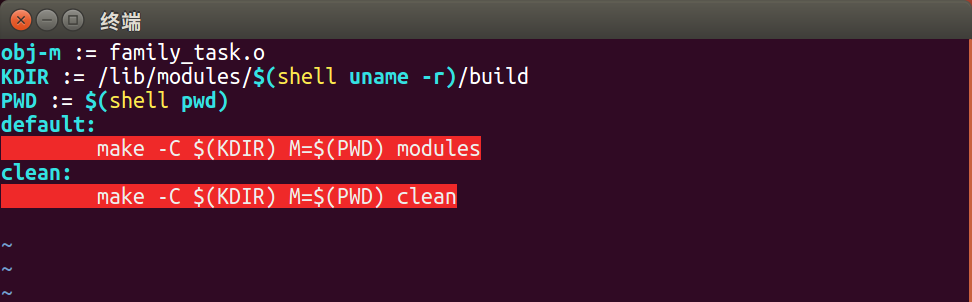
[*] Caution! 再次提醒,make 前是 TAB 而非多个 ,错误缩进会高亮报错且导致编译错误,比如像下面这样
编译模块

1
2
3
4
5
6
7
8
9
$ make # 编译模块
make -C /lib/modules/4.15.0-36-generic/build M=/home/dry/os_2/family_task modules
make[1]: Entering directory '/usr/src/linux-headers-4.15.0-36-generic'
CC [M] /home/dry/os_2/family_task/family_task.o
Building modules, stage 2.
MODPOST 1 modules
CC /home/dry/os_2/family_task/family_task.mod.o
LD [M] /home/dry/os_2/family_task/family_task.ko
make[1]: Leaving directory '/usr/src/linux-headers-4.15.0-36-generic'

加载模块

1
2
3
4
5
6
7
8
9
10
11
$ su root # 启用 root 权限
# insmod family_task.ko pid=1 # 加载模块,并传递参数
# modinfo family_task.ko # 查看模块详细信息
filename: /home/dry/os_2/family_task/family_task.ko
license: GPL
srcversion: 414BB36E6B6BD8D151D4086
depends:
retpoline: Y
name: family_task
vermagic: 4.15.0-36-generic SMP mod_unload
parm: pid:int

查看结果

1
2
3
4
5
6
7
8
9
10
$ dmesg
[53045.039758] familly_task_mod exit
[71883.444523] This process: comm=systemd pid=1 state=1
[71883.444524] his parent: comm=swapper/0 pid=0 state=0
[71883.444525] children: comm=systemd-journal pid=366 state=1
[71883.444526] children: comm=systemd-udevd pid=390 state=0
... ...
[71883.444560] sibling: comm=kthreadd pid=2 state=1
... ...
$ ^C # CTRL+C 退出

检验结果

1
2
3
4
5
6
7
8
9
10
11
12
13
14
15
16
17
18
19
20
21
22
23
24
25
26
$ pstree -p 0 # pstree -p <pid> 查看某进程的进程家族树
?()─┬─kthreadd(2)─┬─acpi_thermal_pm(98)
│ ├─ata_sff(44)
│ ├─charger_manager(133)
│ ├─cpuhp/0(12)
│ ├─cpuhp/1(13)
... ...
│ ├─watchdog/3(26)
│ ├─watchdogd(48)
│ └─writeback(37)
└─systemd(1)─┬─ManagementAgent(1705)─┬─{ManagementAgent}(1708)
│ ├─{ManagementAgent}(1709)
│ ├─{ManagementAgent}(1711)
│ ├─{ManagementAgent}(1712)
│ ├─{ManagementAgent}(1713)
│ └─{ManagementAgent}(1714)
├─NetworkManager(886)─┬─dhclient(35028)
│ ├─dnsmasq(1197)
│ ├─{gdbus}(1029)
│ └─{gmain}(1023)
├─VGAuthService(1656)
├─accounts-daemon(887)─┬─{gdbus}(934)
│ └─{gmain}(898)
├─acpid(900)
... ...
$ ^C # CTRL+C 退出

卸载模块

1
# rmmod family_task.ko # 卸载模块

实验详解

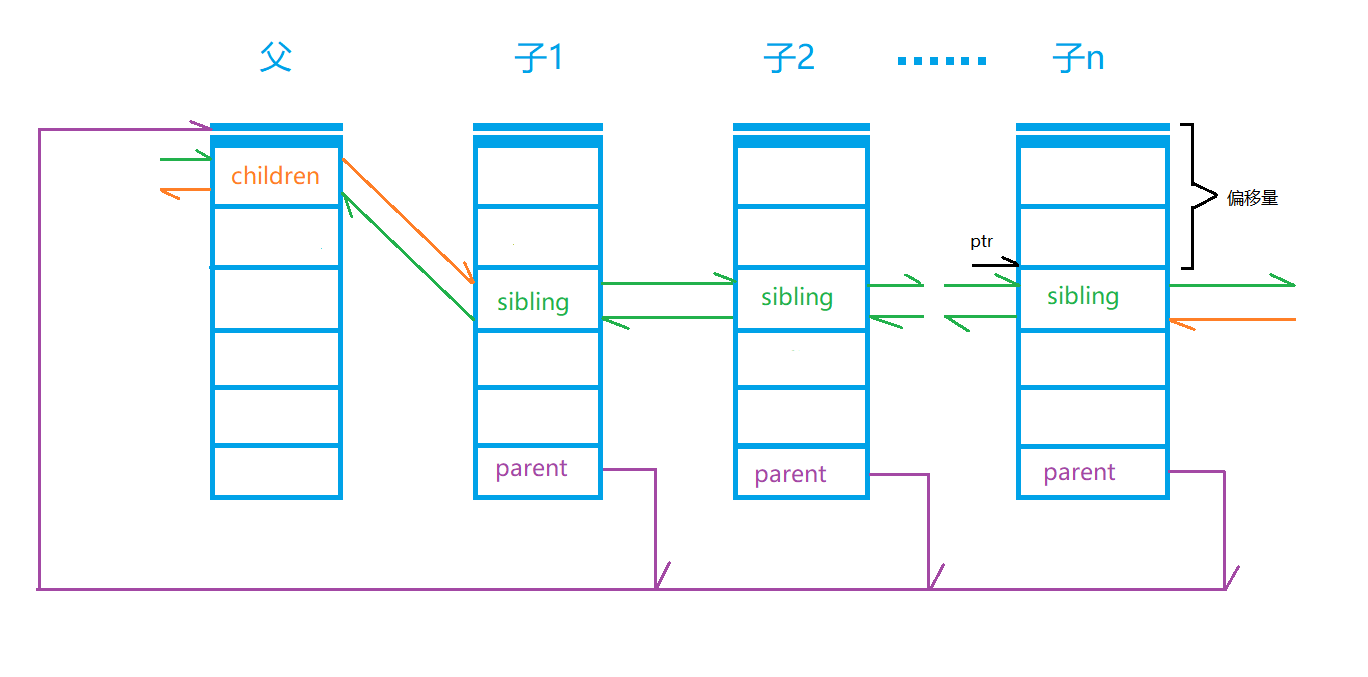
灵魂画师再次放上神图,此图一出,代码即一目了然,再多解释都是枉然!

当然,我还是会主要部分尽量事无巨细地解释的。

find his children

(1)已知甲进程,欲获得 甲进程所有子进程的信息,即此时甲进程为图中的 ,寻其 的方式一目了然。
(2)欲获得乙进程所有信息,需要获得该数据结构首地址
(3)已知某数据结构指向某数据结构成员的指针 ptr ,和该成员的偏移量offset ,可计算该数据结构首地址,即 ptr - offset

find his sibling

(1)已知甲进程,欲获得 甲进程所有兄弟进程的信息,即此时甲进程为图中的 子X ,寻其兄弟及获取兄弟信息的方式类比上文。

恭喜你,又做完一个实验!下次再见!

Remarks

本文编写时主要的参考的资料如下:


END